
The modern workspace is no longer just a physical desk with a computer slapped on top; it is an extension of your cognitive workflow. For software engineers, financial analysts, and digital creators, configuring an optimized desktop ecosystem directly influences sensory processing, focus retention, and operational stamina.
Unfortunately, most users fall into the trap of generic workspace layouts—cluttered with ugly rubber wires, mismatched peripherals, and poorly calibrated hardware frameworks that trigger eye strain and mental fatigue. Methodically customizing your digital and physical desktop architecture is the premier strategy to eliminate friction, secure workplace ergonomics, and maximize daily output.
Physical Infrastructure: The Premium Desk Automation Matrix
Before adjusting software screens or tweaking virtual wallpapers behind the glass, you must calibrate the physical tactile components interacting with your hands and ears. High-end desktop customization is rooted in acoustics and material integrity. Every single keystroke on a custom mechanical board delivers a solid, deliberate response that reinforces your professional concentration. This level of specialization goes far beyond the keyboard switches themselves.
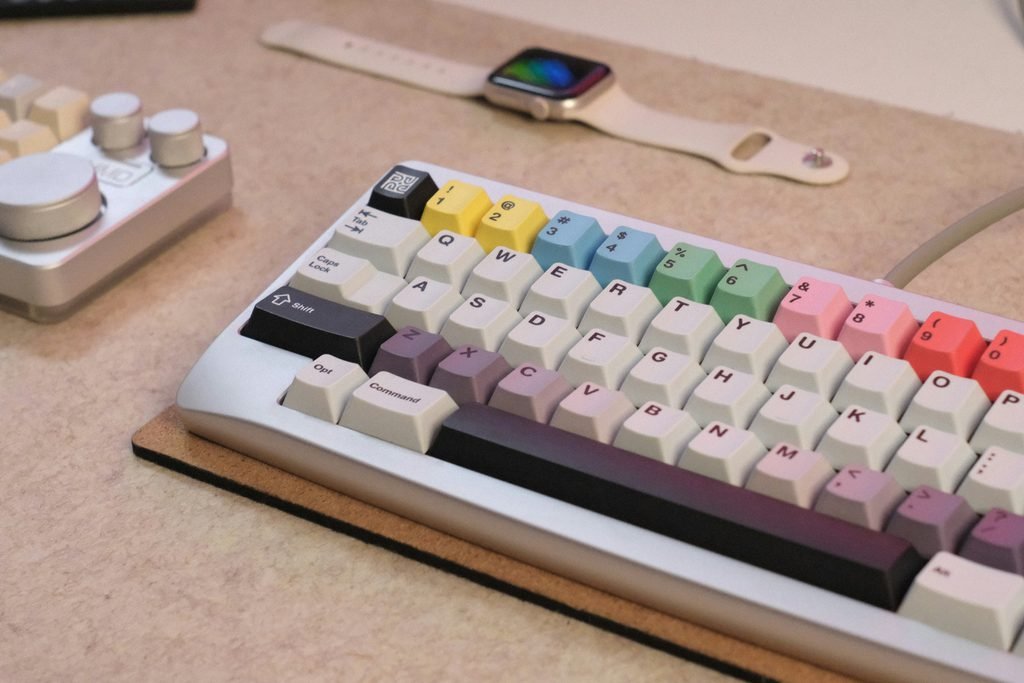
To understand how premium custom components impact your focus blocks, review the structural materials grid below.
High-End Desktop Acoustic & Material Matrix
| Peripheral Component | Material / Aesthetic Purpose | Practical Impact on Executive Focus |
|---|---|---|
| CNC Aluminum Chassis | Eradicates hollow case noise and adds premium weight layers. | Stabilizes the typing deck, removing mechanical rattling completely. |
| Double-Sleeved Cable | Introduces geometric order with industrial aviator locking pins. | Replaces ugly rubber wires with a clean, unyielding layout line. |
| Dense PBT Keycaps | Delivers deep acoustic tones and resists surface sweat oils. | Maintains a pristine satin touch profile across years of high-volume usage. |
Digital Workspace Hardening: Minimalist Operating System Layouts
Once your physical desk topography is cleared of clutter, you must apply identical structural discipline to your digital interface. A crowded computer desktop packed with random file download shortcuts, legacy app uninstaller icons, and bright neon wallpaper designs acts as a continuous source of low-signal visual distraction, hijacking your limited daily supply of decision capital.
To optimize your software interface layout for deep work execution, deploy these system parameter modifications:
- Enforce Complete Desktop Icon Eviction: Right-click an empty space on your desktop grid, navigate to View, and uncheck Show desktop icons. Force your operating system to serve as a clean visual canvas. Route all active data fragments directly into organized root directory paths inside your storage partitions.
- Deploy a Dynamic Taskbar Transparency Engine: The default Windows taskbar is thick and visually intrusive. Use a lightweight open-source software utility like TranslucentTB or edit system registries to make the taskbar completely invisible. This expands your virtual working screen real estate, creating a seamless borderless layout across ultra-wide monitors.
- Calibrate a Uniform Monochromatic Wallpaper Path: Avoid high-contrast photography or bright abstract color pallets. Instead, load a high-definition minimalist neutral tone or flat dark slate wallpaper. This reduces optic nerve stimulation, keeping your eyes completely relaxed during overnight administrative data audits.

Hardware Cable Architecture and Workspace Cable Routing
The true definition of a luxury workstation setup relies on invisible cable management. Leaving multi-wired data loops hanging beneath your desk framework creates a visual anchor that translates into subconscious chaos.
To lock in absolute geometric order, utilize integrated under-desk routing trays paired with heavy-duty hook-and-loop bundling fasteners. Group your primary monitor display lines, high-wattage power delivery blocks, and peripheral conduits into centralized, shielded trunks running flush against the steel frames of your desk infrastructure.
By hiding the physical machinery powering your platform, you create a silent luxury environment where ideas can be executed without sensory interruptions.
Ergonomic Spatial Engineering: Monitor Articulation and Visual Planes
When customizing a high-performance desktop infrastructure, positioning your digital screen real estate is not merely a matter of casual placement. Incorrect display angles force your neck muscles and upper spinal cord into a continuous state of micro-stress, triggering tension headaches and executive exhaustion before the workday concludes.
To build an optimized visual environment, deploy a gas-spring premium dual-monitor mounting arm framework:
- The Focal Distance Protocol: Your primary screen should sit exactly 20 to 30 inches away from your eyes—practically an arm’s length. This specific spatial calibration minimizes the accommodation strain on your optical lenses, preventing premature blurring during long data architecture sweeps.
- The Eye-Level Alignment Gate: The top edge of your active ultra-wide monitor should align perfectly with your horizontal eye level. This forces your gaze slightly downward when tracking data blocks on the interface, keeping your eyelids partially closed to reduce tear film evaporation and halt dry-eye syndrome entirely.
- The 20-20-20 Integration Logic: Program your workspace environment scripts to flash a soft notification every twenty minutes, prompting you to look away from your custom digital canvas toward a physical target located twenty feet away for twenty consecutive seconds. This relaxes your optical focusing muscles, insulating your cognitive focus.
Optical Shielding: Implementing Monitor Lightbars and Bias Lighting
A critical mistake made during minimalist desktop customization loops is executing long workflows in a pitch-black room with only the blinding glow of a high-contrast monitor active. This spatial imbalance creates an aggressive visual contrast trap. Your pupils are forced to constantly expand and contract as your eyes move across bright application windows and dark wallpaper environments, trashing your neuro-stamina.
To seal this environmental vulnerability without cluttering your clean desk setup layout lines, integrate a premium Monitor Lightbar paired with reactive Bias Lighting:
- Asymmetric Optical Projection: A high-end monitor lightbar clips directly onto the top bezel of your display. Unlike generic desk lamps that throw light cells onto the screen surface—causing terrible visual glare—a premium lightbar projects light downward at an asymmetric angle, illuminating only your physical keyboard deck matrix and note-taking workspace.
- Rear Ambient Contrast Balance: Affix a continuous LED light strip running along the rear chassis of your desktop monitors, throwing a soft white patina (calibrated at a neutral 6500K daylight temperature) straight onto the wall behind the desk infrastructure. This ambient backlighting reduces the relative contrast between the bright monitor cells and the dark boundary walls, eliminating optic nerve over-stimulation instantly.
Final Thoughts: The ROI of a Tailored Environment
Customizing your desktop estate is not an aesthetic luxury; it is an uncompromising investment in your cognitive health and digital output efficiency. By streamlining both the material mechanics on your desk and the software architectures inside your screen, you construct an autonomous workflow sanctuary engineered to protect your focus blocks against external distractions.
Maintaining a pristine, well-optimized physical environment is merely one half of the elite workspace equation—securing reliable data network pipelines ensures that your cloud-based tools and automated sync protocols remain completely functional under heavy multitasking operations.
Additionally, establishing clean digital data transmission pipelines avoids localized system congestion entirely. If your custom workstation architecture handles multiple high-definition background syncs or data-intensive workflows simultaneously, reading our advanced network optimization blueprint on how to fix high ping and packet loss in multiplayer games will help you permanently stabilize and insulate your transmission channels.
👉 READ ALSO: Cozy Gaming Setup Ideas: Building Your High-End Sanctuary
Pingback: Premium Home Office Gadgets
Pingback: Premium Intelligent EV Cockpits
Pingback: Bespoke Billionaire Gaming Mansions